

Market Overview Upgrade & New Flexibility
Hey everyone, Anton here. Excited to announce our market overview has just gotten an upgrade.
In this short video, I want to show you what’s new. There’s more flexibility and go over some of the basics of how to work with the market overviews in the IntellCRE platform.
AI-Generated Market Overview
So every time you create a deal in IntellCRE, there is a market overview report that gets AI generated for you.
So once you have a deal in the system and you go to market overviews, you can see that the market overview is divided into several parts.
First one is the general market overview, which is your city overview or larger market overview.
You have the option to AI generate this information.
You have the option to use a custom photo here that’s going to appear in your brochure.
You have the option to switch between a smaller geographical region such as the city and a larger geographical region such as the MSA.
So here you see this is an incorporated place, which is a smaller market overview.
This deal is in Coronado, so that’s a small city within the larger San Diego–Chula Vista–Carlsbad MSA.
And you can also switch to the larger market overview.
As you can see, you can just take a photo uploaded here if you want to switch the photo.
Sometimes the photos are AI generated as well.
And so this is one of the things that we can switch between—a market or a submarket overview—in the general market overview.
And depending on our choice, this is what’s going to be generated in your brochure for the market overview.
Demographics
Now right below the general market overview, we have the demographics.
These are the demographics for the market overview, for the city, or for the MSA that we chose.
So we have demographic tables, things like sports, entertainment, quality of life, population by age.
Employment Data
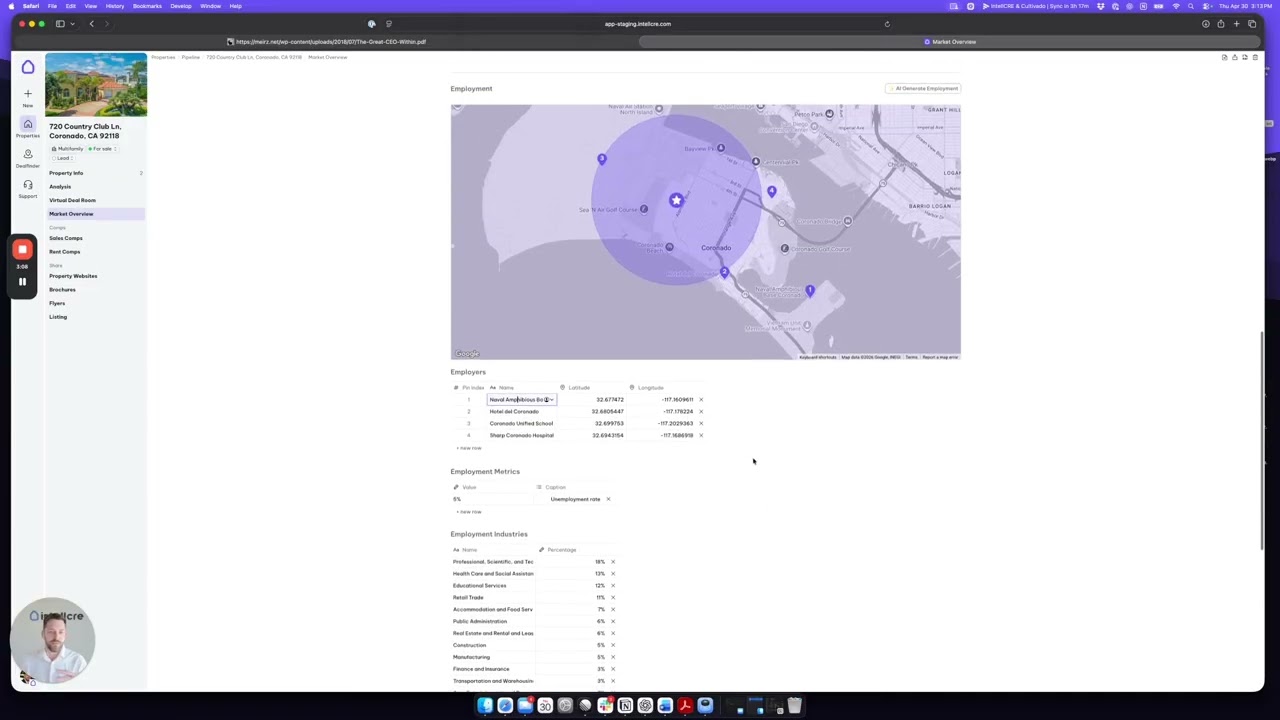
Right below that we have the employment.
And now this employment is basically linked to that market.
So if we have Coronado selected here, you can see that these employers are all employers within Coronado.
Of course you can edit any of this data.
In fact, you can add more data here.
If you have a different source for this data, you can simply copy the entire table and just paste it directly in here.
So you can fully customize all these tables.
You can choose to leave some information or data points out of your brochure or include some extra ones.
Property-Specific Demographic Reports
And then right below this we have property-specific demographic reports, which are basically linked to the very location of the property.
These are radius metrics.
So again, we can copy paste data into these tables as we wish.
We can add groups.
We can customize all this data.
So we have three or four different parts in the market overview.
Add Market Overviews from Anywhere
What’s been added now is the ability for you to actually add a market overview.
And this does not have to be a market overview where this property is located.
So if you have a property that’s sitting on a boundary of a given MSA or a given city and for some reason you would like to use a market overview from a nearby geographical region, you can do that here.
So you can search for either MSA or incorporated place or city overviews anywhere nationwide.
So we can search here El Paso for instance.
And you see you have the El Paso Metropolitan Statistical Area and the El Paso incorporated place.
So smaller and larger market overview options.
Reuse Existing Market Overviews
You can also see all the existing market overviews within your organization or within your account.
Which means that if you have 20 deals in 20 different markets, you’re going to have 20 different market overviews that you’ve already used.
And you’re going to see all of them here.
But you can also find brand new market overviews.
Full Customization
Now you can customize any of these.
As I mentioned, if we don’t want to have the culinary scene there, we can completely get rid of the culinary scene paragraph.
Same with here.
We can add an economy paragraph.
We can paste our data.
And in this way we can customize the market overview.
We can also rename it.
So let’s say this is going to be Coronado version one, which is my custom market overview for Coronado.
And now this is saved and I can reuse this across any deals in my account or future deals.
Manage Market Overviews
You can also see there’s a menu where you can basically manage the market overviews that you have in your account.
You can load any of them.
You can delete any of the custom market overviews here.
You can go back to the default AI-generated ones.
What’s Coming Next
We hope you like the new flexibility that the market overview feature enables you to do.
And in the nearby future, you’ll see an option of adding multiple market overviews.
So if you have a portfolio and need multiple market overviews, you’ll be able to configure multiple overviews that will be added to a brochure.
There’s also going to be more integrations if you want to pull data from a particular source directly into these market overviews.
And finally, one of the biggest changes that’s going to happen in the near future is the ability to actually have all the market overview pages that are going to be present in your brochures be native for page builder.
Meaning all this data is going to automatically prefill predefined page templates.
And you’ll have full customizability of these pages.
From text layouts, adding photos, adding tables—anything you need—you’re going to be able to do in Brochure Builder Version Two, which we’re preparing to launch shortly.
So we look forward to your feedback.
And do let us know if there’s anything you would like to see improved.